Returns the current values of the protocol parameters for the specified channel. Parameters may be set to their defaults or have been changed previously via SET_CONFIG.
IoctlID
0x01
pInput
SCONFIG_LIST* - list of requested parameters
pOutput
NULL (the result is written back to pInput)
SET_CONFIG - Write protocol parameters
Sets the protocol parameter values for the specified channel. Parameters take effect immediately and affect subsequent data exchange.
IoctlID
0x02
pInput
SCONFIG_LIST* - list of parameters to set
pOutput
NULL
Data structures
typedef struct {
    unsigned long Parameter;  // Parameter identifier
    unsigned long Value;      // Parameter value
} SCONFIG;

typedef struct {
    unsigned long NumOfParams;  // Number of parameters in the list
    SCONFIG *ConfigPtr;         // Pointer to the SCONFIG array
} SCONFIG_LIST;
Returned error codes
Code
Description
Possible causes and solutions
STATUS_NOERROR
Function completed successfully
-
ERR_DEVICE_NOT_CONNECTED
No connection to the adapter
The adapter is off or out of range
Solution: check the power and connection
ERR_INVALID_CHANNEL_ID
Invalid channel identifier
ChannelID was not obtained via PassThruConnect
Solution: call PassThruConnect
ERR_NULL_PARAMETER
NULL was passed instead of a pointer
pInput is NULL
Solution: pass a pointer to SCONFIG_LIST
ERR_NOT_SUPPORTED
Parameter not supported
The parameter is not valid for this protocol
Solution: verify parameter/protocol compatibility
ERR_INVALID_IOCTL_VALUE
Invalid parameter value
Value out of allowed range
Solution: check the allowed parameter values
ERR_FAILED
Unspecified error
Internal error
Solution: call PassThruGetLastError()
Protocol parameters
Common parameters (all protocols)
Parameter
Value
Description
Default
LOOPBACK
0x03
Loopback mode: 0 - off, 1 - on
0
For the full list of common parameters, see the SAE J2534-1 standard.
K-Line parameters (ISO 9141 / ISO 14230)
Timing parameters are specified in milliseconds.
Parameter
Value
Description
Default
P1_MAX
0x07
Maximum inter-byte time from the ECU (ms)
20
P3_MIN
0x0A
Minimum time between the end of a response and a new request (ms)
55
P4_MIN
0x0C
Minimum inter-byte time from the tester (ms)
5
For the full list of K-Line parameters, see the SAE J2534-1 standard.
CAN parameters
Parameter
Value
Description
Default
BIT_SAMPLE_POINT
0x17
Bit sample point in % (60-90)
80
SYNC_JUMP_WIDTH
0x18
Synchronization jump width in % (1-25)
15
HS_CAN_TERMINATIONJ2534-2
0x805E
CAN termination: 0 - off, 3 - on
0
ISO 15765 parameters (CAN UDS)
Parameter
Value
Description
Default
ISO15765_BS
0x1E
Block Size (BS) for receiving segmented messages
0 (no limit)
ISO15765_STMIN
0x1F
STmin for receiving - minimum time between CFs (ms)
For the full list of ISO 15765 parameters, see the SAE J2534-1 standard.
CAN_MIXED_FORMAT - Mixed format J2534-2
The CAN_MIXED_FORMAT parameter applies only to ISO 15765 channels. It allows both formatted ISO 15765 messages and raw CAN frames to be received and transmitted on a single channel.
Value
Constant
Description
0
CAN_MIXED_FORMAT_OFF
All messages are processed as ISO 15765 (default)
1
CAN_MIXED_FORMAT_ON
Messages are processed as ISO 15765 or as raw CAN frames
2
CAN_MIXED_FORMAT_ALL_FRAMES
Messages are processed as ISO 15765, raw CAN frames, or both
Important: When this parameter is changed:
The receive and transmit queues are cleared
All PASS_FILTERs and BLOCK_FILTERs are removed
Periodic messages with the raw CAN ProtocolID are removed
When using mixed format:
FLOW_CONTROL_FILTER - applies to ISO 15765 messages
PASS_FILTER / BLOCK_FILTER - applies to raw CAN frames
CAN FD parameters J2534-2
Parameter
Value
Description
Default
FD_CAN_DATA_PHASE_RATE
0x805C
Data rate in the CAN FD data phase (bit/s)
0 (not set)
For the full list of CAN FD parameters, see SAE J2534-2 rev.2020-12, page 87, table 90.
SW-CAN parameters (Single-Wire CAN)
Parameter
Value
Description
Default
SW_CAN_HS_DATA_RATE
0x8010
High-Speed mode data rate (bit/s)
83333
For the full list of SW-CAN parameters, see SAE J2534-2 rev.2020-12, page 29, table 9.
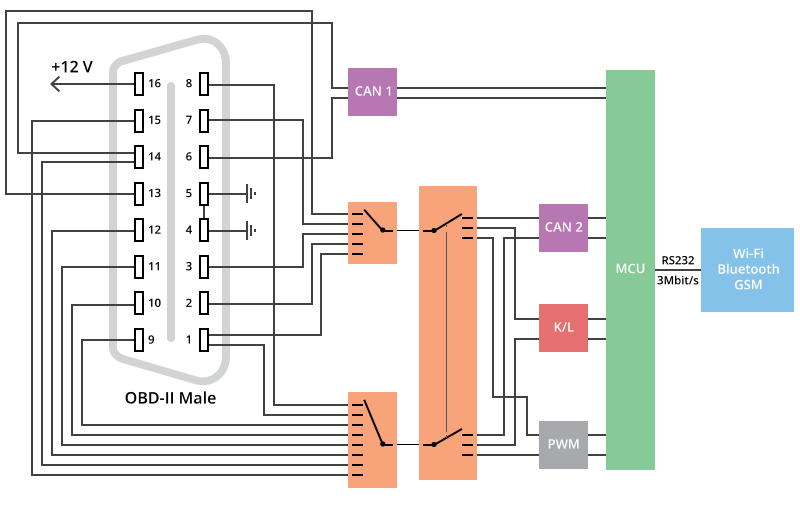
J1962_PINS - OBD-II pin switching
The J1962_PINS parameter (0x8001) allows signal lines to be routed to different pins of the OBD-II connector. The value is a 16-bit number: the high byte is the Primary Pin (PP), the low byte is the Secondary Pin (SS).
Primary Pin is used for K-Line, CAN-H, J1850+. Secondary Pin is used for L-Line, CAN-L, J1850-.
Compact
Constant
Value
Pin
Interface
PP_1 / SS_1
0x01
Pin 1
CAN-H / SW-CAN / K
PP_2 / SS_2
0x02
Pin 2
CAN-H / K / PWM-H / VPW
PP_3 / SS_3
0x03
Pin 3
CAN-H / K
PP_6 / SS_6
0x06
Pin 6
CAN-H
PP_7 / SS_7
0x07
Pin 7
CAN-H / K
PP_8 / SS_8
0x08
Pin 8
CAN-L / K
PP_9 / SS_9
0x09
Pin 9
CAN-L / K
PP_10 / SS_10
0x0A
Pin 10
CAN-L / K / PWM-L
PP_11 / SS_11
0x0B
Pin 11
CAN-L / K
PP_12 / SS_12
0x0C
Pin 12
CAN-L / K
PP_13 / SS_13
0x0D
Pin 13
CAN-H / K
PP_14 / SS_14
0x0E
Pin 14
CAN-L / K
PP_15 / SS_15
0x0F
Pin 15
CAN-L / K / L
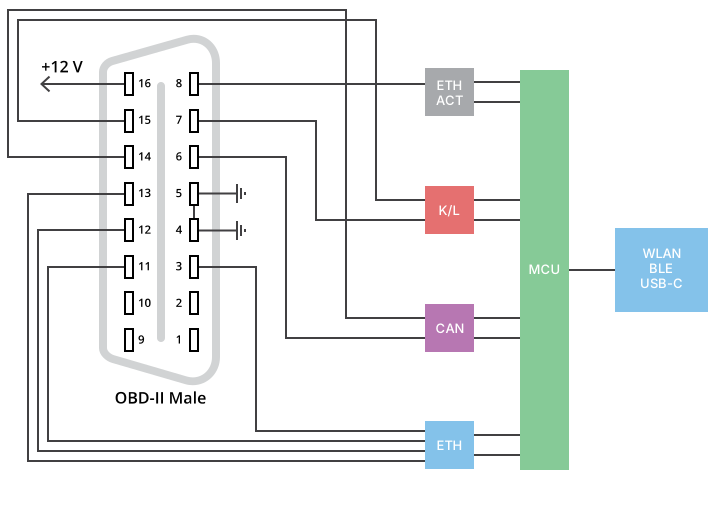
Nano ET
Constant
Value
Pin
Interface
PP_6 / SS_6
0x06
Pin 6
CAN-H
PP_7 / SS_7
0x07
Pin 7
K
PP_14 / SS_14
0x0E
Pin 14
CAN-L
PP_15 / SS_15
0x0F
Pin 15
L
The Nano ET pinout is fixed, so J1962_PINS accepts only these values. The Ethernet pins 3/11 and 12/13 and the activation line on pin 8 are set by the NDIS_PINS_OPTION parameter, not by J1962_PINS.
TP 2.0 parameters (VAG) J2534-2
The TP 2.0 protocol is used in VAG vehicles (Volkswagen, Audi, Skoda, Seat) for diagnostics.
TP 2.0 also supports the DATA_RATE, LOOPBACK, BIT_SAMPLE_POINT, SYNC_JUMP_WIDTH and J1962_PINS parameters. Defaults: LOOPBACK = 0, BIT_SAMPLE_POINT = 80%, SYNC_JUMP_WIDTH
= 15%.
Parameter
Value
Description
Default
TP2_0_T_BR_INT
0x8044
Broadcast interval - interval between the 5 messages of a single broadcast transmission (ms)
20
TP2_0_T_E
0x8045
Maximum wait time for Channel Acknowledge or Connection Acknowledge (ms)
100
TP2_0_MNTC
0x8046
Number of retries for connection management messages
10
For the full list of TP 2.0 parameters, see SAE J2534-2 rev.2020-12, page 78, table 77.
UART Echo Byte parameters J2534-2
The UART Echo Byte protocol is used for diagnostics of older vehicles (SAE J2809, SAE J2818). All timing parameters are specified in milliseconds.
Parameter
Value
Description
SAE J2809
SAE J2818
UEB_T0_MIN
0x8028
Minimum idle time before transmitting the address byte
t0
T_R0
UEB_T1_MAX
0x8029
Maximum time between stimulation and the start of the sync byte
t1
t_r1
UEB_T2_MAX
0x802A
Maximum time between the sync byte and KeyByte 1
t2
t_r2
For the full list of UART Echo Byte parameters, see SAE J2534-2 rev.2020-12, page 46, table 36.
Examples
GET_CONFIG - reading parameters
C/C++ example
#include "j2534_dll.hpp"

unsigned long ChannelID;  // Obtained from PassThruConnect
SCONFIG Config[2];
SCONFIG_LIST ConfigList;
long ret;

// Request DATA_RATE and ISO15765_STMIN
Config[0].Parameter = DATA_RATE;
Config[0].Value = 0;
Config[1].Parameter = ISO15765_STMIN;
Config[1].Value = 0;

ConfigList.NumOfParams = 2;
ConfigList.ConfigPtr = Config;

ret = PassThruIoctl(ChannelID, GET_CONFIG, &ConfigList, NULL);
if (ret == STATUS_NOERROR)
{
    printf("DATA_RATE: %lu bps\n", Config[0].Value);
    printf("ISO15765_STMIN: %lu ms\n", Config[1].Value);
}
Kotlin example (Android)
// channelID obtained from ptConnect
val params = listOf(
    PtConfig(parameter = DATA_RATE, value = 0u),
    PtConfig(parameter = ISO15765_STMIN, value = 0u)
)

val result = j2534.ptIoctl(channelID, GET_CONFIG, params.size, params.toByteArray())
if (result.status == STATUS_NOERROR) {
    val resultParams = result.toConfigList()
    resultParams.forEach { config ->
        Log.i("J2534", "Parameter ${config.parameter}: ${config.value}")
    }
}
Python example
from ctypes import *

config = (SCONFIG * 2)()
config[0].Parameter = DATA_RATE
config[1].Parameter = ISO15765_STMIN

config_list = SCONFIG_LIST()
config_list.NumOfParams = 2
config_list.ConfigPtr = config

ret = j2534.PassThruIoctl(channel_id, GET_CONFIG, byref(config_list), None)
if ret == 0:
    print(f"DATA_RATE: {config[0].Value} bps")
    print(f"ISO15765_STMIN: {config[1].Value} ms")
C# example
var configs = new SCONFIG[2];
configs[0].Parameter = DATA_RATE;
configs[1].Parameter = ISO15765_STMIN;

var configList = new SCONFIG_LIST {
    NumOfParams = 2,
    ConfigPtr = configs
};

int ret = J2534.PassThruIoctl(channelId, GET_CONFIG, ref configList, IntPtr.Zero);
if (ret == 0)
{
    Console.WriteLine($"DATA_RATE: {configs[0].Value} bps");
    Console.WriteLine($"ISO15765_STMIN: {configs[1].Value} ms");
}
SET_CONFIG - setting parameters
C/C++ example - ISO 15765 configuration
#include "j2534_dll.hpp"

unsigned long ChannelID;  // Obtained from PassThruConnect for ISO15765
SCONFIG Config[3];
SCONFIG_LIST ConfigList;
long ret;

// Set ISO 15765 parameters
Config[0].Parameter = ISO15765_STMIN;
Config[0].Value = 0;  // No delay between CFs
Config[1].Parameter = ISO15765_BS;
Config[1].Value = 0;  // No block size limit
Config[2].Parameter = ISO15765_PAD_VALUE;
Config[2].Value = 0xCC;  // Padding value 0xCC

ConfigList.NumOfParams = 3;
ConfigList.ConfigPtr = Config;

ret = PassThruIoctl(ChannelID, SET_CONFIG, &ConfigList, NULL);
if (ret != STATUS_NOERROR)
{
    char error[256];
    PassThruGetLastError(error);
    printf("SET_CONFIG error: %s\n", error);
}
C/C++ example - J1962_PINS configuration
#include "j2534_dll.hpp"

unsigned long ChannelID;
SCONFIG Config[1];
SCONFIG_LIST ConfigList;
long ret;

// Route K-Line to Pin 3, L-Line to Pin 11
Config[0].Parameter = J1962_PINS;
Config[0].Value = PP_3 | SS_11;  // 0x030B

ConfigList.NumOfParams = 1;
ConfigList.ConfigPtr = Config;

ret = PassThruIoctl(ChannelID, SET_CONFIG, &ConfigList, NULL);
if (ret == STATUS_NOERROR)
{
    printf("K-Line routed to Pin 3, L-Line to Pin 11\n");
}
Kotlin example (Android)
// channelID obtained from ptConnect
val params = listOf(
    PtConfig(parameter = ISO15765_STMIN, value = 0u),
    PtConfig(parameter = ISO15765_BS, value = 0u),
    PtConfig(parameter = ISO15765_PAD_VALUE, value = 0xCCu)
)

val result = j2534.ptIoctl(channelID, SET_CONFIG, params.size, params.toByteArray())
if (result.status == STATUS_NOERROR) {
    Log.i("J2534", "ISO 15765 parameters set")
} else {
    Log.e("J2534", "SET_CONFIG error: ${result.status}")
}
Python example
from ctypes import *

config = (SCONFIG * 2)()
config[0].Parameter = DATA_RATE
config[0].Value = 500000  # 500 kbps
config[1].Parameter = CAN_MIXED_FORMAT
config[1].Value = 1  # Enable mixed format

config_list = SCONFIG_LIST()
config_list.NumOfParams = 2
config_list.ConfigPtr = config

ret = j2534.PassThruIoctl(channel_id, SET_CONFIG, byref(config_list), None)
if ret == 0:
    print("CAN parameters set")
C# example
var configs = new SCONFIG[2];
configs[0].Parameter = DATA_RATE;
configs[0].Value = 500000;  // 500 kbps
configs[1].Parameter = HS_CAN_TERMINATION;
configs[1].Value = 3;  // Enable termination

var configList = new SCONFIG_LIST {
    NumOfParams = 2,
    ConfigPtr = configs
};

int ret = J2534.PassThruIoctl(channelId, SET_CONFIG, ref configList, IntPtr.Zero);
if (ret == 0)
{
    Console.WriteLine("Parameters set");
}